

The setup guide
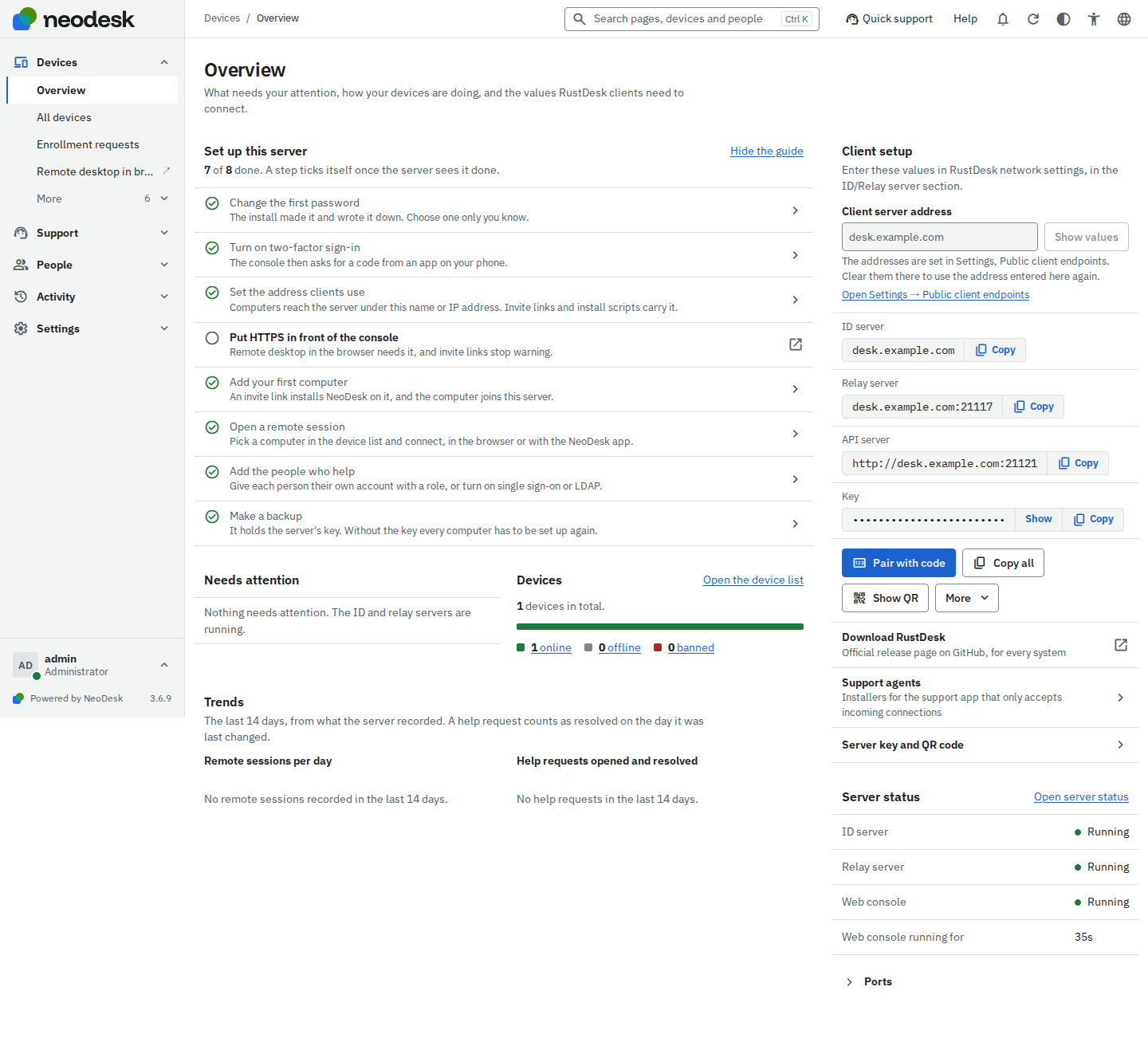
Copy as MarkdownA new install opens the overview with a setup guide for its first admin. It is a checklist, Set up this server, with eight steps in the order a new admin needs them. Each step leads to the place where you do it, and ticks itself once the server sees it done. There is no way to tick a step by hand.
Who sees it
The guide opens by itself once, for the first admin account of a new install. An install counts as new when the server set up its database at this start, or when nobody has used it yet: no account has ever signed in and it has no device. An update never opens the guide on an install that was in use, and no other account gets it by itself.
Only accounts with the permission Server configuration see the guide and can bring it back, see Hide it and bring it back.
The steps
The guide lists the steps in this order. An account gets only the steps it may do itself, so another admin can see fewer than eight.
| Step | Where it leads | Ticks itself when |
|---|---|---|
| Change the first password | Settings, Sign-in, the password form | The first admin's password is no longer the one the install made |
| Turn on two-factor sign-in | Settings, Sign-in, Two-factor sign-in | Your account has two-factor sign-in on |
| Set the address clients use | Settings, General, Public client endpoints | The address clients get is one other computers can reach |
| Put HTTPS in front of the console | Reverse proxy and TLS, in a new tab | You opened the console over HTTPS, or the console serves HTTPS itself |
| Add your first computer | Add a computer, right on the overview | The server has a device |
| Open a remote session | All devices | The server has seen a remote session |
| Add the people who help | Users | Another account that is not disabled exists, or single sign-on or LDAP is on |
| Make a backup | Settings, Backup, Create a backup | A backup was made by hand, or a scheduled backup succeeded |
The progress line above the list counts the steps, for example "3 of 8 done. A step ticks itself once the server sees it done." When every step is done it says "All steps are done. You can hide the guide now."
Which steps an account gets
- Change the first password shows only to the first admin, the account the guide opened for, and only while it signs in with a password of its own.
- Turn on two-factor sign-in shows to accounts that sign in with a password of their own, not through single sign-on or LDAP.
- Add your first computer needs Approve enrollment.
- Open a remote session needs Connect to devices.
- Add the people who help needs Create users.
- Make a backup shows only to Super admin and Administrator accounts, because only they may make a full backup.
When a step counts as done
Set the address clients use looks at the address the server gives clients
when nobody names one. It stays open while that address is localhost, a
loopback address or 0.0.0.0, a name without a dot (such as a container's
name), or a name that ends in .local. Set the address under
Public client endpoints, as
Set the address clients use
describes.
Put HTTPS in front of the console is done when you use the console over HTTPS. Behind a reverse proxy that ends TLS, the console has to trust the proxy, or it can't see that the request came over HTTPS; see Trusting the proxy. The step is also done when the console serves HTTPS on its own port, as the Linux and Windows scripts set it up on 5443.
Open a remote session counts any session to any device: one the server set up, in the browser or in an app, or one a client reported.
A session, a backup and a changed first password stay done once the guide has seen them, even after their trace has left the logs.
Doing a step
Click a step. Most steps open a page of the console with a line above it: Back to the setup guide, and the step's name after "Step:". The line takes you back to the overview. Add your first computer opens Add a computer on the overview itself, and Put HTTPS in front of the console opens the docs in a new tab, because HTTPS is set up outside the console.
The overview checks the steps every 30 seconds while its tab is open, when you choose Refresh, and when Add a computer closes.
Hide it and bring it back
Hide the guide, at the top right of the guide, hides it for your account. The console then says "The setup guide is hidden. Help and Settings bring it back." The steps it noted stay as they are.
To show it again, choose Show the setup guide in one of two places:
- Help in the top bar, at the top of the panel
- Settings, then General, at the end of the side column
Both open the overview with the guide. Hiding the guide or bringing it back changes it only for your account.
On the command line
The command line shows the same steps, for an account with Server configuration:
neodesk setup-guide statusneodesk setup-guide hide and neodesk setup-guide show do what the buttons
do. See neodesk setup-guide.