

Reverse proxy and TLS
Copy as MarkdownThe web console listens on plain HTTP on port 3375. Before people use it over the internet, give it HTTPS. Remote desktop in the browser needs it too: over plain HTTP the viewer shows only devices with a hardware H.264 encoder (see HTTPS for every device). There are three ways:
- Docker with a DNS name for the server: the install script puts Traefik in front of the console, with a certificate from Let's Encrypt. See HTTPS with Let's Encrypt on Docker.
- A reverse proxy of your own, such as nginx or Caddy. Most of this page is about this way, from What goes through the proxy on, with complete examples, the settings NeoDesk needs behind a proxy, and what a proxy cannot carry.
- The console's own HTTPS, with a certificate you give it. See HTTPS without a proxy.
HTTPS with Let's Encrypt on Docker
On a Docker install, --domain and --email make the install script add a Traefik container in front of the console. Traefik gets a certificate for the name from Let's Encrypt, renews it by itself and sends plain HTTP on to HTTPS. The name has to point at the server, and ports 80 and 443 have to be free on the host and reachable from the internet.
For an install that runs already, run the script in /opt/neodesk/docker, with the DNS name in place of <domain> and your email address in place of <email-address>:
sudo bash neodesk-docker.sh --domain <domain> --email <email-address>The one-line install takes the same as --domain and --letsencrypt-email. The script turns on the compose profile traefik, publishes the console's own ports 3375 and 5443 on 127.0.0.1 only, and sets TRUST_PROXY=1 and PANEL_PUBLIC_URL=https://<domain>. --letsencrypt-staging gets a test certificate from Let's Encrypt's staging server, and --no-traefik takes it all out again, TRUST_PROXY included. HTTPS with Let's Encrypt on the Docker page has the details.
Use your own proxy instead when another web server already has ports 80 and 443 on the host, or when the server can't be reached from the internet on port 80, where Let's Encrypt checks the name.
Which port the proxy forwards to
The console's default port is 3375 since 3.6.0-rc.5; it was 5000. The examples on this page use 3375.
- New installs use 3375.
- Linux and Windows installs made before 3.6.0-rc.5 keep 5000, because their env file names it. A proxy in front of them stays on 5000.
- Docker installs with the default compose file move to 3375 at their next update with the script. After that update, a proxy in front of a Docker install has to forward to 3375, unless you keep 5000 with
NEODESK_CONSOLE_PORT=5000in/opt/neodesk/docker/.env. Traefik, set up with--domain, follows by itself.
CONSOLE_PORT or PORT in the env file, and NEODESK_CONSOLE_PORT in Docker's .env, name the port an install uses. See Ports and firewall.
What goes through the proxy
- The console on port 3375: its pages, its API under
/api/, and its WebSockets under/ws/, which carry remote desktop in the browser and live updates. The proxy has to pass WebSocket upgrades. - If you want clients to get an HTTPS API address, the API port as well, on a host name of its own. See HTTPS for the client API.
The ID server (21116, TCP and UDP), the relay (21117) and the NAT test (21115) speak the RustDesk protocol, not HTTP. An HTTP proxy cannot carry them, so clients connect to those ports directly. See Ports and firewall.
Send every path on the console's host name to the console. It uses /ws/rendezvous and /ws/relay itself for remote desktop in the browser, so don't route those paths to another port.
Keep the console local
With the proxy on the same machine, let only the proxy reach the console's port:
-
Docker: set
NEODESK_CONSOLE_BIND=127.0.0.1in the.envfile next to the compose file, then recreate the container in that folder. The console's ports are then published on the loopback address only. With--domainthe install script sets this for you.docker compose up -d -
Linux and Windows: set
HOST=127.0.0.1in the env file. The installers also turn on HTTPS with a self-signed certificate, and the plain port then only redirects to 5443, so setHTTPS_ENABLED=falseas well. Restart the service.
With the proxy on another machine, keep HOST=0.0.0.0 and allow the console's port only from the proxy's address in the firewall.
On Linux, the installer can make these settings. Start it:
sudo neodesk-setupThen choose Configure SSL certificates, then External reverse proxy. A new install offers the same at its end. It asks for the console's public host name, turns off the console's own HTTPS, and sets HOST, TRUST_PROXY=Y, PANEL_PUBLIC_HOST, PANEL_PUBLIC_URL, PUBLIC_SERVER_ID, WS_ALLOWED_ORIGINS and, for a proxy on the same machine, TRUSTED_PROXIES. It also takes TLS off the ID server and relay, and writes example configurations for Caddy or nginx to /opt/neodesk/reverse-proxy/.
nginx
Get a certificate for the console's host name first, for example with certbot; the paths below are where certbot keeps it. Then save this as a site, for example /etc/nginx/conf.d/neodesk.conf, with the host name in place of <server-address>:
map $http_upgrade $connection_upgrade {
    default upgrade;
    ''      close;
}

server {
    listen 80;
    listen [::]:80;
    server_name <server-address>;
    return 301 https://$host$request_uri;
}

server {
    listen 443 ssl;
    listen [::]:443 ssl;
    server_name <server-address>;

    ssl_certificate     /etc/letsencrypt/live/<server-address>/fullchain.pem;
    ssl_certificate_key /etc/letsencrypt/live/<server-address>/privkey.pem;

    # The console takes backups of up to 200 MB for a restore
    client_max_body_size 200m;

    location / {
        proxy_pass http://127.0.0.1:3375;
        proxy_http_version 1.1;
        proxy_set_header Host $host;
        proxy_set_header X-Real-IP $remote_addr;
        proxy_set_header X-Forwarded-For $remote_addr;
        proxy_set_header X-Forwarded-Proto $scheme;
        proxy_set_header Upgrade $http_upgrade;
        proxy_set_header Connection $connection_upgrade;
        proxy_read_timeout 1h;
        proxy_send_timeout 1h;
    }
}
The long timeouts keep remote sessions in the browser open. $proxy_add_x_forwarded_for works as well as $remote_addr: the console and the server's API walk X-Forwarded-For from the right and take the first address that is not a trusted proxy, so entries a client wrote itself don't count.
Check and load the configuration:
sudo nginx -t
sudo systemctl reload nginx
Caddy
Caddy gets and renews the certificate itself, passes WebSocket upgrades and sets the forwarded headers. Add this to /etc/caddy/Caddyfile, with the console's host name in place of <server-address>:
<server-address> {
	reverse_proxy 127.0.0.1:3375
}
Then reload it:
sudo systemctl reload caddyTrusting the proxy
Behind a proxy, every request reaches NeoDesk from the proxy's address. TRUST_PROXY tells NeoDesk to take the client's address, the scheme and the host from the proxy's headers instead. Without it, the sign-in limits and lockouts count every person as the proxy, and the activity log shows the proxy's address.
Two parts of the server read it:
- The console reads
TRUST_PROXYalone. An on value such asY,trueor1trusts one proxy in front of it; a larger number trusts that many; a comma-separated list of addresses or ranges (orloopback,linklocal,uniquelocal) trusts proxies with those addresses. - The server's API and WebSocket ports read forwarded headers only with
TRUST_PROXYon and only from the addresses inTRUSTED_PROXIES. WithoutTRUSTED_PROXIESthe server logs a warning and ignores the headers. This matters for requests the proxy sends to the server's own ports, such as the API host below.
Y works for both parts. For a proxy on the same machine as a Linux or Windows install, put this in the env file:
TRUST_PROXY=Y
TRUSTED_PROXIES=127.0.0.1/32,::1/128
In Docker, put both lines in the .env file next to the compose file. Requests from a proxy on the host reach the container from the Docker network, so use that network's range for TRUSTED_PROXIES. Compose puts the name of the install folder in front of the network's name: an install made with the script, in /opt/neodesk/docker, has the network docker_neodesk-net, and a compose file in a folder neodesk has neodesk_neodesk-net. docker network ls lists the networks. For an install made with the script, this shows the range under Subnet:
docker network inspect docker_neodesk-netWarning
TRUST_PROXY=Y trusts whoever connects to the console. Make sure only the proxy can reach the console's port, or anyone can claim any address.
Secure cookies
The console marks its session and form cookies Secure when the request came over HTTPS: on its own HTTPS port, or through a trusted proxy that sends X-Forwarded-Proto: https. Behind a proxy that ends TLS, set TRUST_PROXY and leave HTTPS_ENABLED off; nginx with the configuration above and Caddy both send that header.
HTTPS_ENABLED=true belongs to a console that serves HTTPS itself. With a certificate in SSL_CERT_PATH and SSL_KEY_PATH, the plain port then only redirects to its own HTTPS port, and a proxy that sends requests to the plain port gets no console. The Linux and Windows installers turn it on, so set HTTPS_ENABLED=false there when a proxy sits in front, as in Keep the console local.
HTTPS for the client API
To give clients an HTTPS API address, route a second host name through the proxy to the client API port, 21121 on every install type. The API needs its own host name because the console has its own /api/ paths. For nginx, add this server block next to the one above, with the API's host name in place of <api-address>:
server {
    listen 443 ssl;
    listen [::]:443 ssl;
    server_name <api-address>;

    ssl_certificate     /etc/letsencrypt/live/<api-address>/fullchain.pem;
    ssl_certificate_key /etc/letsencrypt/live/<api-address>/privkey.pem;

    location / {
        proxy_pass http://127.0.0.1:21121;
        proxy_http_version 1.1;
        proxy_set_header Host $host;
        proxy_set_header X-Real-IP $remote_addr;
        proxy_set_header X-Forwarded-For $remote_addr;
        proxy_set_header X-Forwarded-Proto $scheme;
        proxy_set_header Upgrade $http_upgrade;
        proxy_set_header Connection $connection_upgrade;
    }
}
For Caddy, with the API's host name in place of <api-address>:
<api-address> {
	reverse_proxy 127.0.0.1:21121
}
Then enter https://<api-address> as Public API URL under Settings, General, and set TRUSTED_PROXIES as described above.
The server can also serve TLS on its API port itself, with TLS_API=Y, TLS_CERT and TLS_KEY. The port then takes HTTPS only, and clients set up with an http:// address fail. TLS_SIGNAL=Y and TLS_RELAY=Y are different: they add TLS to the ID server and relay ports and still take plain connections there.
Mesh agents behind a proxy
Mesh agents that reach the server through the proxy see the proxy's certificate. When TLS_CERT is set, as on a Linux or Windows install where the installer made certificates, the server checks that a mesh agent saw that certificate, and refuses an agent that saw another one. Point MESH_WEB_CERT_FILE at a copy of the proxy's certificate that the service can read. The server reads it at start, so restart it after the proxy renews the certificate.
HTTPS without a proxy
The console can serve HTTPS itself: set HTTPS_ENABLED=true, SSL_CERT_PATH and SSL_KEY_PATH (and SSL_CA_PATH for a chain in a separate file). It then listens with TLS on HTTPS_PORT, 5443 by default, and the plain port (CONSOLE_PORT, 3375 by default) redirects every request there, to the host PANEL_PUBLIC_HOST names or to the one address the console listens on. When the console listens on every address and PANEL_PUBLIC_HOST is unset, the plain port shows a page that asks for it instead of redirecting. HTTP_REDIRECT_HTTPS=false turns the redirect off.
The Linux and Windows installers set this up on a new install with a self-signed certificate, valid for ten years, and set PANEL_PUBLIC_HOST to the address clients use unless the env file has one. On Linux, the installer's Configure SSL certificates menu replaces the certificate with one from Let's Encrypt, your own, or a new self-signed one. A Let's Encrypt certificate is copied to /opt/neodesk/ssl/, where the service account can read it, and a certbot deploy hook copies it again and restarts the server after each renewal. The menu also offers port 443, with port 80 for the redirect, and gives the service the right to use ports below 1024. Without that right the console falls back to 5443 and its plain port.
Check the addresses clients get
Open Settings, General. Under Public client endpoints, enter the host name clients use for the ID server as Public ID server, and your API address as Public API URL if you proxied the API. What clients get now on the right shows the values the client setup, the QR codes and the install commands use.
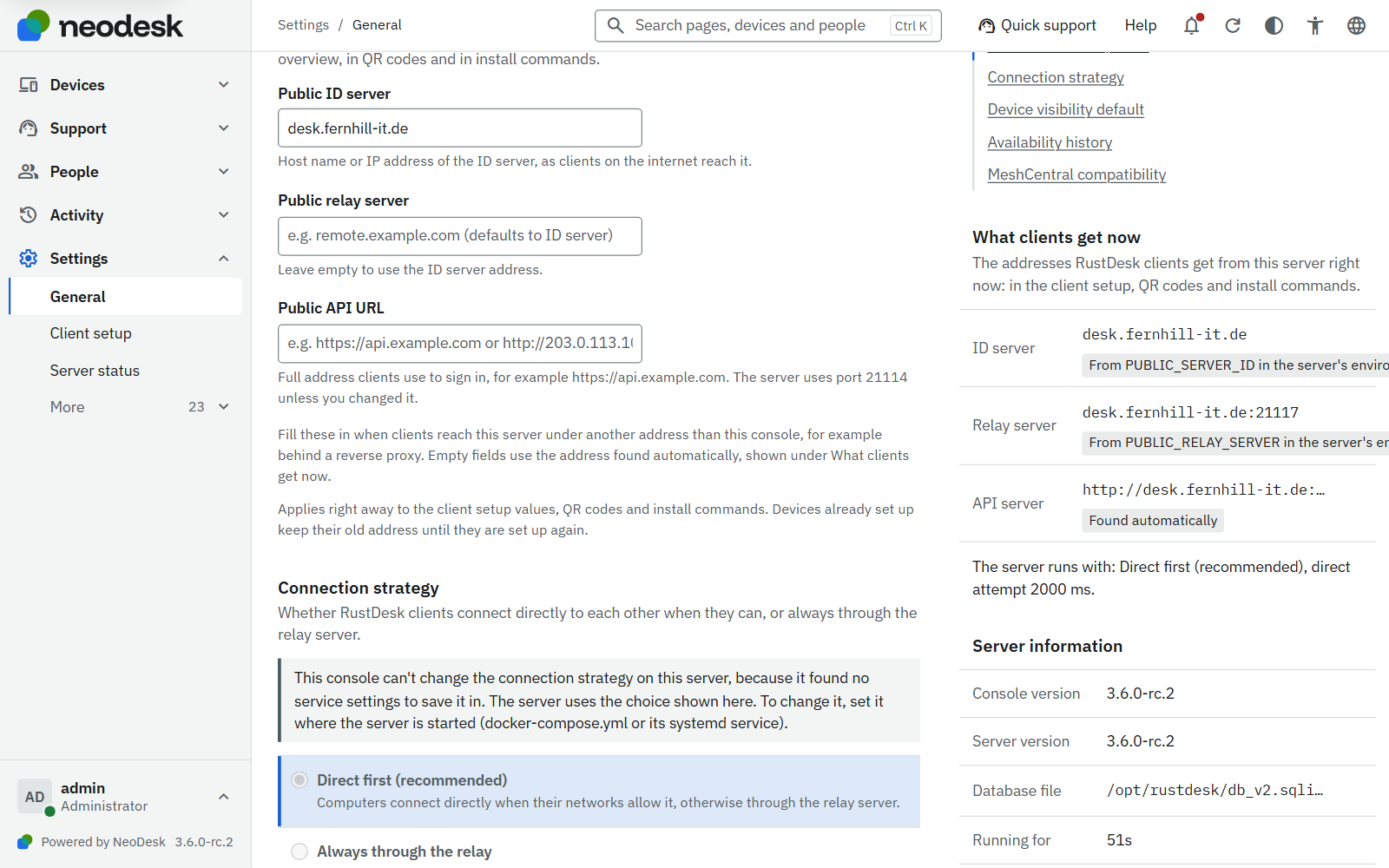
Then check the rest:
- Set
PANEL_PUBLIC_URL=https://<server-address>, so links in mails point at the proxy. In Docker this goes into the.envfile. curl https://<server-address>/healthanswers{"status":"ok",...}through the proxy.- Sign in through the proxy. The browser's developer tools show the session cookie,
nd.sid(orneodesk.sidwithHTTPS_ENABLED=true), as Secure. - Clients still need the ID server and relay ports open. See Connect a client.